Working · 4 of 6
Cloud VMs
Every AWS account the Mac's credentials reach shows up on its own, region by region, without installing anything — Shellden talks to AWS itself.
Where the accounts come from
Profiles in `~/.aws` are read in place: static keys,
role_arn roles (assumed through STS) and IAM Identity Center profiles the AWS CLI already signed in. Profiles that run a command (credential_process) or use aws login are counted but not read yet.+ Connect account → Access key saves a key ID and secret: AWS checks them first, and the secret stays in the Keychain. The × on its row removes it (a second click confirms), secret included.
+ Connect account → IAM Identity Center (SSO) signs in with the company's start URL (the address of its AWS access portal) and its region, no AWS CLI needed. AWS's own page opens in the browser for the password and MFA; the code it shows matches the one in the dialog. Once approved, every account and role the sign-in reaches appears in the tree as
account · role. The session lasts what the company set (usually 8 hours); when it ends, the directory's row offers Sign in again, and its × forgets it (a second click confirms), session included. The session stays in the Keychain.Console-account sign-in from Shellden itself is on its way, and so are Microsoft and Google.
The tree
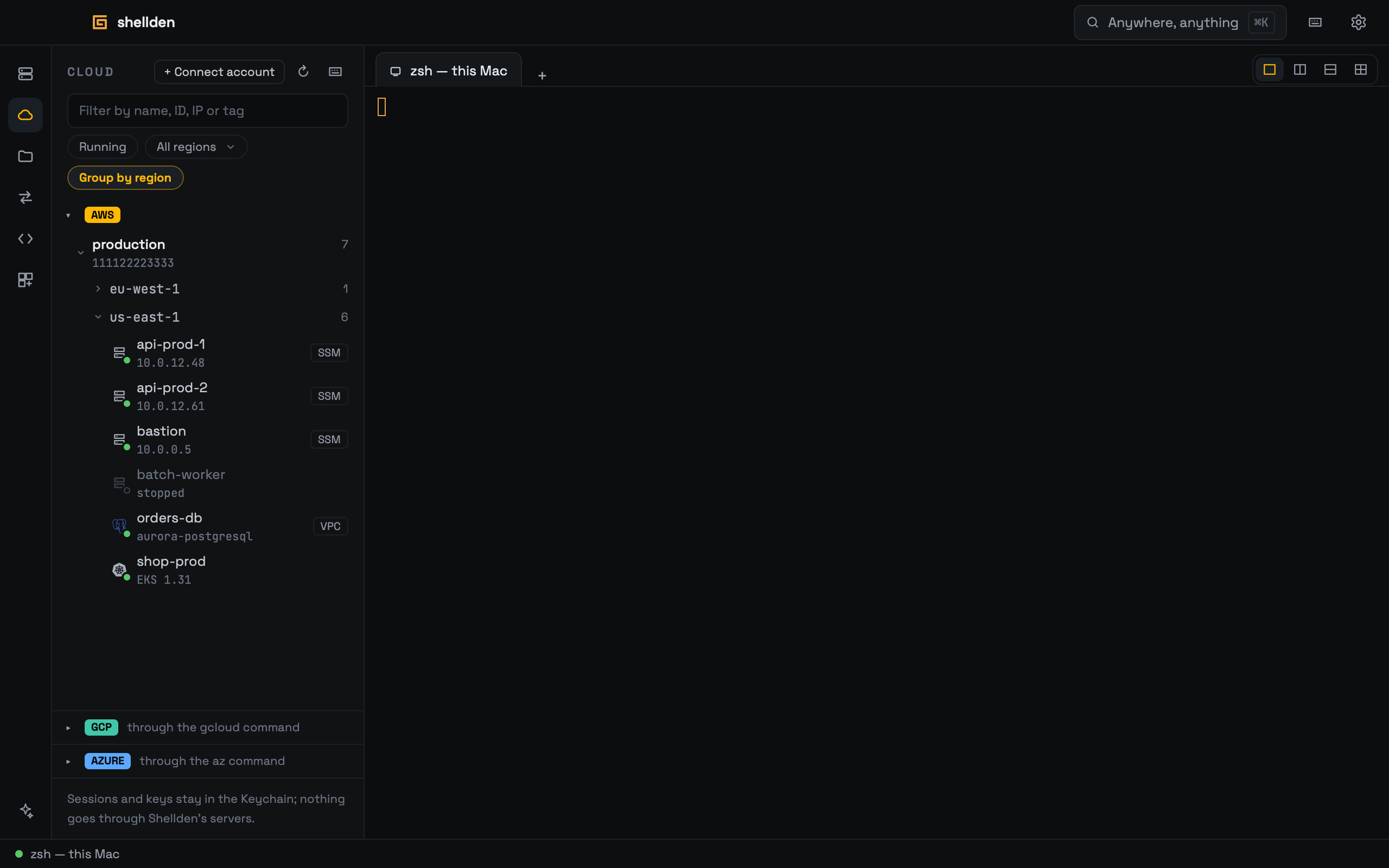
Account → region → instance, with the account ID and how many instances each level holds. Regions the identity may not read are counted on the account row ("regions out of reach"); an identity that can read none is dimmed with the reason.
Regions start closed, with their instance count, so many accounts fit on one screen; what gets opened or closed is remembered. While an account is being read, a thin bar under it fills as regions answer.
Each instance shows its address; the ID, type and zone are in its tooltip.
Filter by name, ID, address or tag (
env=prod) — every region with a match opens by itself; Running hides the rest; a region, or every one; Group by region on or off.A click on a running instance opens an SSM Session Manager shell in a tab — Shellden speaks Session Manager itself, so neither the AWS CLI nor its session-manager plugin is needed. The instance needs the SSM agent and an instance profile that allows it; sessions that the account encrypts with KMS are not supported yet (the tab says so).
Databases and clusters in the cloud
Every row carries the same mark as the host list — a server for an instance, the engine's logo for a database, the Kubernetes wheel for a cluster — with a dot in its corner: green when it is up, hollow when it is stopped or not ready.
Each region also lists its RDS and Aurora instances (PostgreSQL, MySQL, MariaDB, SQL Server), marked public or VPC. A click opens the database form already filled — engine, endpoint, port, database, master user, TLS Require (RDS certificates come from Amazon's own CA) — and only the password is left to type; it goes to the Keychain.
A database inside a VPC is reached through a saved SSH host with Tunnel through SSH host. Engines without a console here (Oracle, Db2) show dimmed.
EKS clusters appear in their region too. A click opens the Cluster view — pods, workloads, config, network — with a token Shellden signs itself, as
aws eks get-token would, so no kubeconfig entry or AWS CLI is needed. The identity needs access to the cluster (an EKS access entry or the aws-auth mapping). The kubectl console works there too.Google Cloud and Azure
Until their sign-in arrives they work through gcloud and az: their row takes the project or subscription, Sign in runs the CLI's browser login in a tab, and a click opens gcloud compute ssh --tunnel-through-iap or az ssh vm.
Cloud VMs are part of Pro; on Free the panel explains so.